
Private Podcast App Guide for Teams and Creators
private podcast appprivate podcast feedsecure podcast distributionprivate RSS feedteam podcast app
15 min read
Most advice about a private podcast app is too shallow. It tells you to hide the feed, hand out a unique link, and call it secure. That's incomplete. Private podcasting is a two-sided privacy problem, and if you ignore the client side, you can still expose who listened, when they listened, and how long they stayed in the episode.
A better way to choose is to separate feed secrecy from listener telemetry. The hosting side controls who can fetch the audio. The client side controls what the listening app reports back. If you're shipping private audio for a course, an internal team, or paid members, that split matters more than any feature checklist.
| Private Podcast App Feature Comparison | App | Auth Method | Analytics | Integrations | Pricing Tier | Best For |
|---|---|---|---|---|---|---|
| Private Podcast App Feature Comparison | Supercast | Member login and private feed delivery | Membership-focused analytics | Membership platforms and paid show workflows | Subscription platform tier | Creator memberships where the feed itself is the product |
| Private Podcast App Feature Comparison | Transistor | Private feeds with host-managed access | Host analytics with private-show support | Broad hosting stack | Host plan tier | Teams running public and private shows together |
| Private Podcast App Feature Comparison | Buzzsprout | Private podcasts through host tools | Standard host reporting | Hosting-first workflows | Host plan tier | Small shows that want a familiar publishing flow |
| Private Podcast App Feature Comparison | Podia | Account-based access around digital products | Product and membership tracking | Courses and memberships | Membership platform tier | Creators bundling audio with other gated content |
| Private Podcast App Feature Comparison | Memberful-integrated feeds | Membership account access | Membership-level visibility | Memberful and connected hosts | Depends on host and membership stack | Sites that already run paid access on Memberful |
| Private Podcast App Feature Comparison | Captivate | Private podcast support in a host stack | Host-level analytics | Brand and publishing workflows | Host plan tier | Brand teams that want one place for public and private audio |
| Private Podcast App Feature Comparison | Hello Audio | Listener access around private audio delivery | Program-level tracking | Coaching and course workflows | App platform tier | Courses, coaching, and client audio delivery |
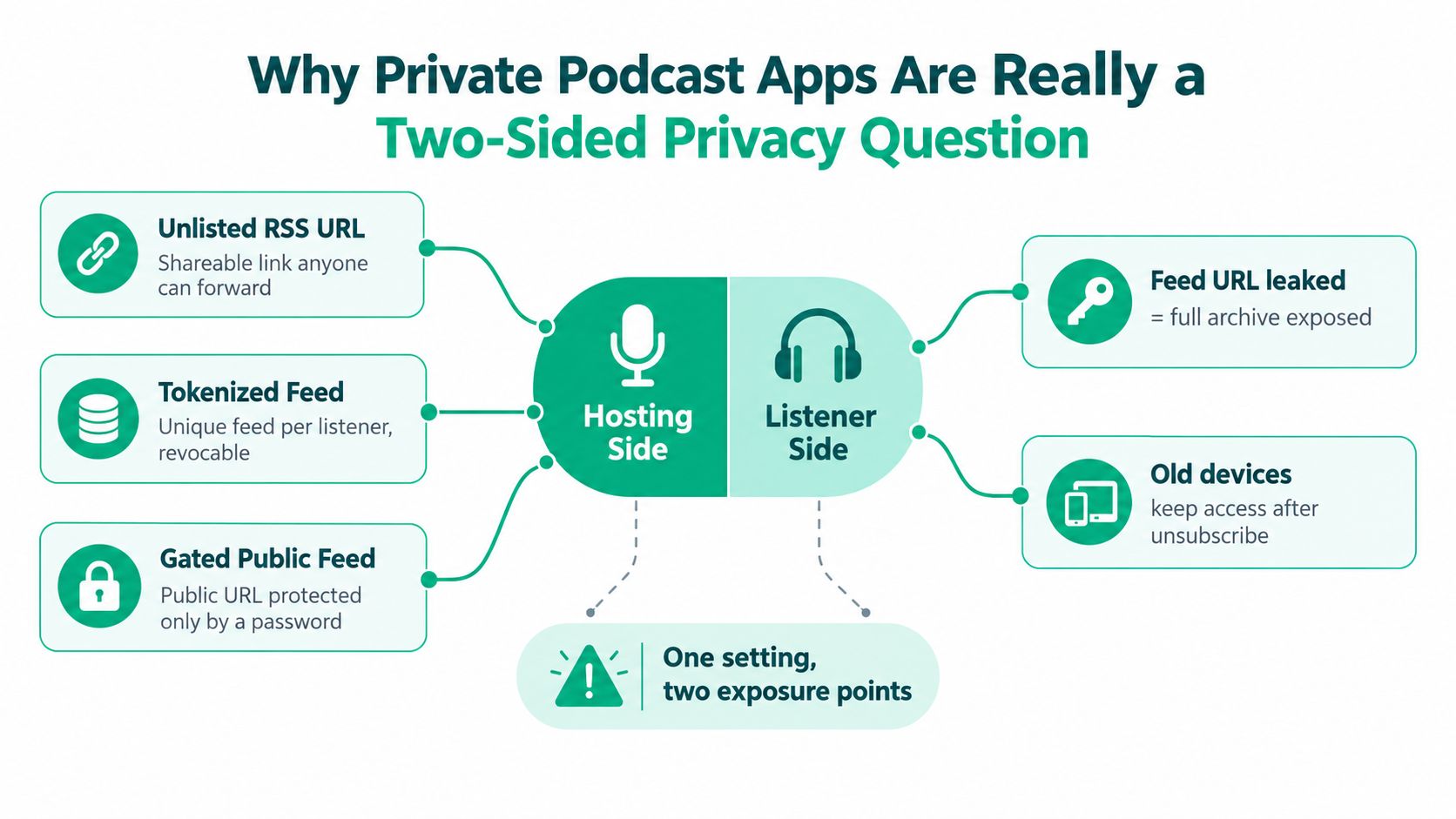
A private podcast app is not just a locked RSS feed. It's a distribution system on one side and a listening environment on the other. If you only secure the feed, you've solved half the problem and left the rest to the podcast client.
On the hosting side, private delivery can use an unlisted URL, a tokenized feed, or a gated public feed. Each one behaves differently if a link leaks, and only the tokenized model gives you clean per-listener revocation. Google's Podcasts Manager notes that custom or private feeds can be blocked, need an access token, or be inaccessible, and it can't show data for them, which is a blunt reminder that private audio sits outside public measurement systems (Google support).
On the listener side, the app matters just as much. If somebody imports your feed into a mainstream client that reports listening history, device data, or playback position, then the feed itself may be private while the usage metadata is not.
Practical rule: If the audience is sensitive, never approve a hosting setup until you've checked the client app it will land in.
The cleanest example is a course creator who assumed tokenization solved privacy. The link stayed private, but students still consumed episodes through a mainstream app that exposed enough telemetry to make the setup less private than it looked. If you're evaluating a platform, read its data protection policy with the same attention you give the feed architecture, because the operational truth lives in both places. For a deeper note on feed-side privacy patterns, the internal overview at private podcast privacy is worth comparing against your own setup.
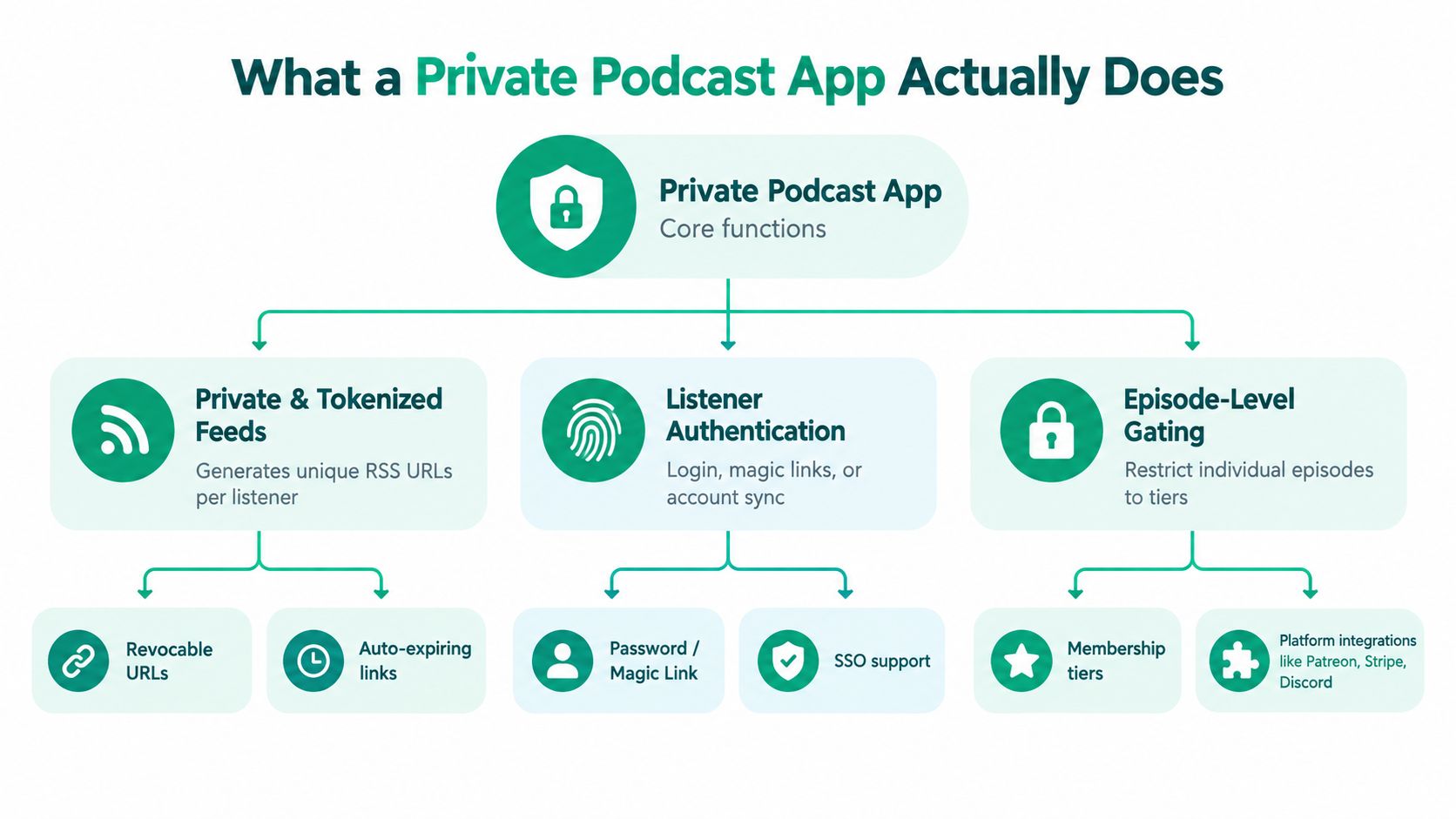
A private podcast app wraps feed generation, authentication, and access control into one workflow. The reason teams buy one instead of stitching together five tools is simple. They want the feed to work, the right people to get in, and cancelled users to lose access without chaos.
A private RSS feed is usually just unlisted. That's convenient, but if someone forwards the URL, the gate is gone. A tokenized feed gives each listener a unique URL, which is the model you want when revocation matters, because you can cut off one person without breaking the rest of the audience (RSS feed primer).
A gated public feed sits somewhere else in the stack. It can keep the show visible while forcing login before access, which can be fine for brand-led communities. For corporate or education use, though, I'd rather see account-based access than a public URL with a password wall.
Use private RSS when the audience is casual. Use tokenized RSS when access needs to be revoked cleanly. Use member accounts when your compliance or billing process already lives elsewhere.
A private podcast app usually sits above hosting, CMS, CDN, and playback. It may plug into Memberful, Patreon, Stripe, or a learning platform, then generate the listener-specific feed on top. The point isn't just to publish audio. It's to coordinate who gets which episode, when, and under what rules.
If you're comparing tools, don't get distracted by surface polish. Ask which layer is doing the actual work. A true private podcast app should manage authentication, feed distribution, and episode gating rather than just hiding a link behind a form.
If you're selling a membership, the first question isn't “Which app has the longest feature list?” It's “Which app matches the way the listener is already paying and listening?” That's why the right answer changes by use case.
Supercast fits creators who want the podcast feed itself to be the paid product. It's a practical choice when the buyer expects to subscribe, paste the feed into a podcast client, and move on. Memberful-integrated feeds work better when the membership site already exists and audio is just one perk inside a broader paid system.
Transistor is the cleaner pick when a team runs public and private shows together. It keeps hosting operations under one roof, which matters if your brand has multiple feeds and you don't want a maze of separate tools. Buzzsprout is simpler and usually appeals to smaller teams that want host-native private podcast features without building a bigger membership stack around them.
Podia belongs in the “bundled product” lane. It works when the audio is part of a course, membership, or digital product lineup. Hello Audio is the more obvious fit when the product is coaching, lessons, or client delivery, not a conventional podcast business.
Captivate can suit brand teams that want private podcasting inside a standard hosting workflow. Rooy Development is another option in this space for teams that want individualized feeds per listener as part of an automated audio workflow, especially when the use case is recurring briefings or source-driven episodes rather than a classic public show.
Don't buy for elegance. Buy for the access model you actually need.
| App | Authentication | Analytics Depth | Integrations | Fit |
|---|---|---|---|---|
| Supercast | Member-based access | Membership-oriented | Payment and membership stacks | Paid memberships with simple delivery |
| Transistor | Host-managed private access | Host-level reporting | Multi-show hosting | Teams running public plus private feeds |
| Buzzsprout | Private feed access | Standard host reporting | Lightweight publishing stack | Small shows and straightforward premium feeds |
| Podia | Account-based access | Product-level tracking | Courses and memberships | Audio inside a broader digital product |
| Memberful-integrated feeds | Member account auth | Membership visibility | Memberful plus host connectors | Existing membership sites |
| Captivate | Host-side gating | Host analytics | Brand publishing workflows | Brand teams and internal series |
| Hello Audio | Program access | Program-level reporting | Course and coaching workflows | Courses, coaching, client audio |
A paid membership under 100 listeners doesn't need enterprise ceremony. It needs reliable token delivery, easy cancellation, and a listener experience that doesn't create support tickets. A corporate intranet is the opposite. It needs SSO, revocation, and auditability more than it needs a fancy public landing page.
A tokenized feed does not guarantee private listening. Once the episode lands in a client app, the app decides how much metadata to generate, retain, or share. That's the gap most private podcast discussions gloss over.
Mainstream podcast players can expose listening behavior through account sync, device-level telemetry, playback history, and progress data. In a workplace or course setting, that can reveal who opened the feed, how often they played it, and where they stopped. The feed stays locked, but the usage trail doesn't.
That's why client choice matters for sensitive audiences. A team might think it has built a confidential update channel, then discover that the playback app leaves enough traces to make the channel less private than the inbox it was meant to replace. If you're dealing with legal, HR, student, or executive material, that's not a cosmetic issue.
Start with the privacy label, then inspect the app's behavior in practice. Watch for whether it works offline, whether it syncs state across devices, and whether it sends unnecessary analytics during play. I'd rather approve a boring player with a narrow data footprint than a shiny one that hoovers usage data.
| Client-side telemetry exposure across common podcast apps | Podcast Client | Telemetry Sent By Default | Works Offline | Custom Server Endpoint |
|---|---|---|---|---|
| Client-side telemetry exposure across common podcast apps | Apple Podcasts | Device and usage metadata through the platform ecosystem | Yes | No |
| Client-side telemetry exposure across common podcast apps | Spotify | Playback and account-linked usage data | Yes | No |
| Client-side telemetry exposure across common podcast apps | Overcast | Limited compared with major platform apps, but still app-dependent | Yes | No |
| Client-side telemetry exposure across common podcast apps | Pocket Casts | Lower-friction listening with app-level account behavior | Yes | No |
| Client-side telemetry exposure across common podcast apps | AntennaPod | Minimal if auto-sync and external reporting are disabled | Yes | No |
| Client-side telemetry exposure across common podcast apps | Web embed or custom player | Depends on your implementation | Depends on build | Yes |
If privacy is the selling point, I'd keep a shortlist of clients that limit leakage and avoid making the listener install an app whose telemetry you can't explain. The right question is not “Can they listen?” It's “What gets emitted when they do?”
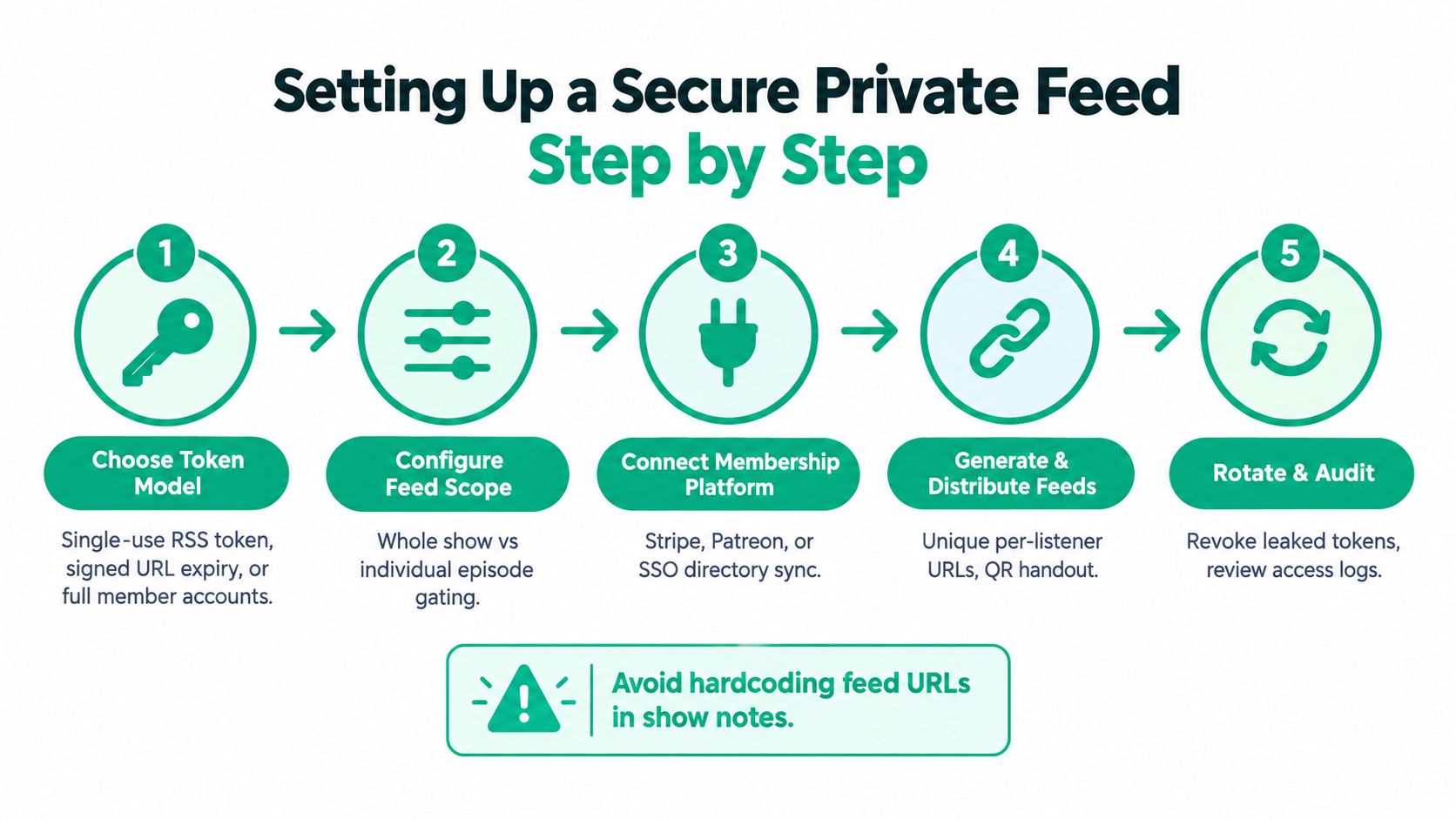
Choose the access model before choosing software. Use per-listener tokens for audiences with frequent churn. Use member-account authentication with SSO when access follows corporate identity. Signed URLs suit stable, low-risk shows, but I would not use them for sensitive material.
Generate the feed in your hosting platform using this private podcast RSS feed setup guide, then enforce HTTPS-only delivery. Give every listener a unique token or magic link. For corporate distribution, connect OAuth or SAML. For a university course, sync the roster from the LMS so enrollment and feed access remain aligned.
The host controls feed secrecy, but the listener's app controls what telemetry leaves the device. Choose a client that matches your privacy requirements, and document that choice for subscribers.
Operational rule: Rotate URLs per user, not per show. If one link leaks, revoke one listener instead of rebuilding the entire distribution system.
Control episode availability as carefully as feed access. Keep unreleased audio off the delivery path until publication. Prefetched episodes create a leak even when the feed URL remains protected.
Keep recovery procedures simple. If a token appears in Slack, revoke it, issue a replacement, and review the access logs. A platform that cannot perform those actions cleanly is not ready for a serious private feed.
The right setup changes depending on who's listening and why they're there. A paid membership does not need the same controls as an internal comms channel, and neither one should look like a student course feed.
For creator memberships, I'd use token-per-subscriber delivery through a payment or membership webhook, then gate episodes by publish date. That keeps the feed tied to billing and lets you stop access cleanly when someone cancels. A web fallback player helps listeners who refuse to add another app.
The minimum viable setup is simple. Give each member a unique feed, connect access to payment status, and document how they can subscribe in Apple Podcasts or another player. The most common mistake is handing out one shared link in a welcome email and pretending the checkout system makes it safe.
For internal audio, identity should come first. Use SAML SSO tied to Okta or Entra, pair it with a clear offboarding flow, and keep telemetry disclosure tight enough that IT can defend it. If the org is sensitive, a controlled client allowlist is worth the effort, because the goal is not just access control. It's minimizing device-side noise.
Keep episode analytics private and short-lived. HR, leadership, and compliance teams do not want a public dashboard for internal listening behavior. The mistake I see most is teams overbuilding the publishing workflow and underbuilding revocation for departing employees.
A university feed should follow the roster, not the marketing calendar. Sync access from the LMS, gate episodes to the semester, and keep analytics out of the student view. If instructors need grading support, give them an export path that stays separate from the student experience.
The minimum viable setup is roster-based tokens and a course calendar. The common failure is letting students share the feed link in a group chat, then discovering that one student's access outlives the course because nobody tied revocation to enrollment.
| Recommended private feed configurations by scenario | Use Case | Auth Method | Episode Gating | Analytics Exposure |
|---|---|---|---|---|
| Recommended private feed configurations by scenario | Paid creator memberships | Token-per-subscriber or payment-linked access | Publish-date gating | Member-level only |
| Recommended private feed configurations by scenario | Corporate internal comms | SAML SSO with employee identity | Role-based release windows | Private admin reporting |
| Recommended private feed configurations by scenario | University course | LMS-synced roster tokens | Semester-based gating | Instructor-only export |
If you're running a paid membership, pick the tool that handles Stripe-native gating and revocation without support drama. If you're handling internal comms, choose the vendor that gives you SSO, audit logs, and clean offboarding. If you're running a course, the winner is the app that syncs cleanly with your LMS and gives instructors the access control they need.
Before you commit, verify six things: token rotation, IP allowlisting if you need it, data retention, client telemetry disclosure, export portability, and price pressure as the audience grows. Disqualify any vendor with opaque analytics endpoints, no per-listener revocation, no documented breach process, or pricing that punishes growth.
Request a sandbox feed, run a revocation test, and check the client-side privacy posture before you move a live show. If you want a private podcast setup that's built around listener-specific feeds and recurring delivery, visit Rooy Development and see how its private feed workflow fits your use case.
Transform your content into engaging podcasts in seconds with our AI-powered platform.
Get Started Now